

- Posts: 11875
- Thank you received: 2429
Kunena 6.3.0 released
The Kunena team has announce the arrival of Kunena 6.3.0 [K 6.3.0] in stable which is now available for download as a native Joomla extension for J! 4.4.x/5.0.x/5.1.x. This version addresses most of the issues that were discovered in K 6.2 and issues discovered during the last development stages of K 6.3
Question How to translate the tooltip texts of the bbcode editor buttons?
7 years 4 months ago - 7 years 4 months ago #21
by rich
Replied by rich on topic How to translate the tooltip texts of the bbcode editor buttons?
Yes, that's a redundant and will removed (it's on our list).I don't understand why there are two "en-GB.com_kunena.libraries.ini" files - one in administrator/components/kunena/language/en-GB and another in administrator/language/en-GB)
Could be a cache problem, or your Kunena template has own language files.It still shows the tooltips in English. Hence, this should be a cache issue?
Last edit: 7 years 4 months ago by rich.
Please Log in or Create an account to join the conversation.
7 years 4 months ago #22
by hannes01
Everything about fishing & tackle: forum, local and international shop
Replied by hannes01 on topic How to translate the tooltip texts of the bbcode editor buttons?
Hi,
I switched to Crypsis and the issue remains.
If its a cache issue... might there be some cache that I don't know about yet?
I switched to Crypsis and the issue remains.
If its a cache issue... might there be some cache that I don't know about yet?
Everything about fishing & tackle: forum, local and international shop
Please Log in or Create an account to join the conversation.
7 years 4 months ago #23
by rich
Replied by rich on topic How to translate the tooltip texts of the bbcode editor buttons?
Yes, there are more than one cache. On Joomla template it's a own cache possible, browser cache is very stubborn, or media/kunena/cache etc.. I also not known all possibility.
Please Log in or Create an account to join the conversation.
- WolfgangOWL
-

- Offline
- Senior Member
7 years 3 months ago #24
by WolfgangOWL
Replied by WolfgangOWL on topic How to translate the tooltip texts of the bbcode editor buttons?
Same problem with our forum. Cleared all cache (Kunena and Joomla) and browser cache. Language for bbcode editor buttons is still English.
Please Log in or Create an account to join the conversation.
7 years 2 months ago - 7 years 2 months ago #25
by hannes01
Everything about fishing & tackle: forum, local and international shop
Replied by hannes01 on topic How to translate the tooltip texts of the bbcode editor buttons?
I did more testing with the Crypsis template and found out following:
although Kunena is supposed to use Estonian language strings everywhere, for the editor tooltip texts it picks up English language strings.
Here are the screenshots:

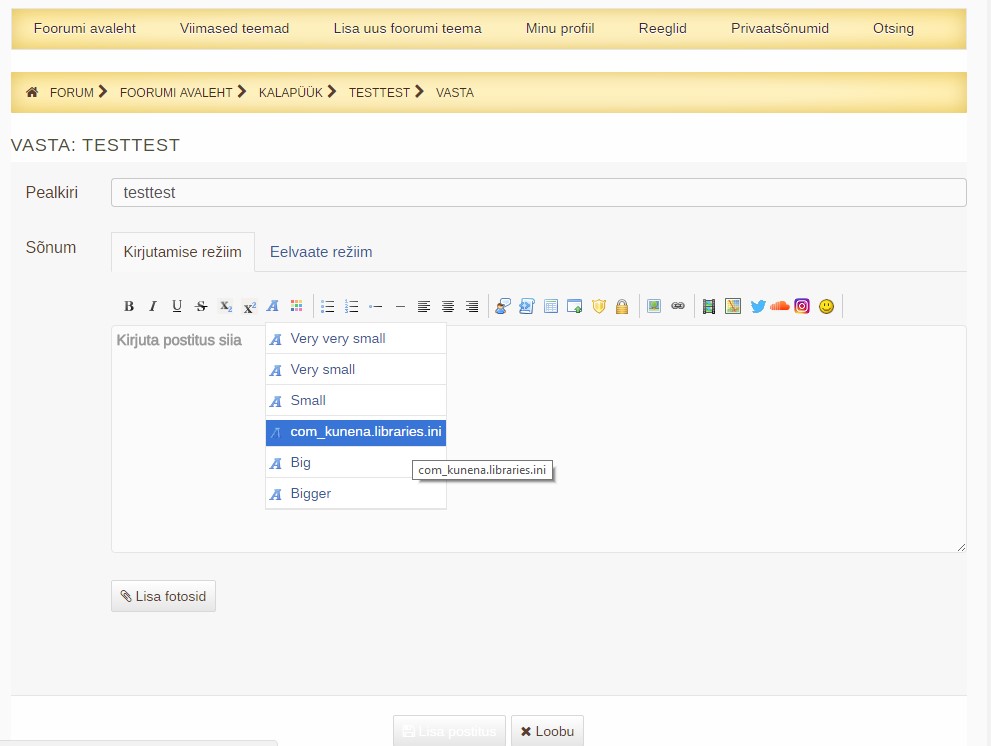
As you can see, it picks up the strings from /administrator/components/com_kunena/language/en-GB/en-GB.com_kunena.libraries.ini although it should pick them up from /administrator/language/et-EE/et-EE.com_kunena.libraries.ini
These screenshots are taken after rebuilding the plugins and cleaning cache.
As there are other people with the same issue in this thread, what is the reason of this kind of behavior for some Kunena installations?
although Kunena is supposed to use Estonian language strings everywhere, for the editor tooltip texts it picks up English language strings.
Here are the screenshots:
As you can see, it picks up the strings from /administrator/components/com_kunena/language/en-GB/en-GB.com_kunena.libraries.ini although it should pick them up from /administrator/language/et-EE/et-EE.com_kunena.libraries.ini
These screenshots are taken after rebuilding the plugins and cleaning cache.
As there are other people with the same issue in this thread, what is the reason of this kind of behavior for some Kunena installations?
Everything about fishing & tackle: forum, local and international shop
Last edit: 7 years 2 months ago by hannes01.
Please Log in or Create an account to join the conversation.
7 years 2 months ago #26
by hannes01
Everything about fishing & tackle: forum, local and international shop
Replied by hannes01 on topic How to translate the tooltip texts of the bbcode editor buttons?
As there's not much feedback in here, here's an obvious temporary solution (and not an elegant one):
Copy YOURLANGUAGE.com_kunena.libraries.ini from /administrator/language/YOURLANGUAGE/ to /administrator/components/com_kunena/language/en-GB/ and rename it to en-GB.com_kunena.libraries.ini.
I suggest to keep the original en-GB.com_kunena.libraries.ini of course and rename it temporarily (in hope of the future fix).
Copy YOURLANGUAGE.com_kunena.libraries.ini from /administrator/language/YOURLANGUAGE/ to /administrator/components/com_kunena/language/en-GB/ and rename it to en-GB.com_kunena.libraries.ini.
I suggest to keep the original en-GB.com_kunena.libraries.ini of course and rename it temporarily (in hope of the future fix).
Everything about fishing & tackle: forum, local and international shop
Please Log in or Create an account to join the conversation.
- WolfgangOWL
-
- Offline
- Senior Member
7 years 2 months ago #27
by WolfgangOWL
Unfortunately, this is no option for me because my site uses two languages (German and English). I tried all hints that were suggested in this forum (clear joomla, Kunena and browser cache, rebuild Kunena plugins). Nothing worked. I hope this will be fixed asap!
Replied by WolfgangOWL on topic How to translate the tooltip texts of the bbcode editor buttons?
hannes01 wrote: Copy YOURLANGUAGE.com_kunena.libraries.ini from /administrator/language/YOURLANGUAGE/ to /administrator/components/com_kunena/language/en-GB/ and rename it to en-GB.com_kunena.libraries.ini.
I suggest to keep the original en-GB.com_kunena.libraries.ini of course and rename it temporarily (in hope of the future fix).
Unfortunately, this is no option for me because my site uses two languages (German and English). I tried all hints that were suggested in this forum (clear joomla, Kunena and browser cache, rebuild Kunena plugins). Nothing worked. I hope this will be fixed asap!
The following user(s) said Thank You: hannes01
Please Log in or Create an account to join the conversation.
Time to create page: 0.428 seconds